Ride the Coaster
Keyless
Coin adder script (No Key)
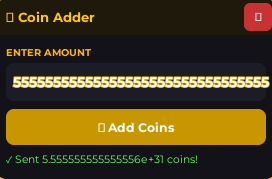
This script is made for Roblox *Ride the Coaster* and allows you to generate unlimited coins, so you can buy any item in the game.
✨ Features
enter amount
5555555555555555555555555555555555
add coins
📋 Script Code
-- Coin Adder GUI

local Players = game:GetService("Players")
local ReplicatedStorage = game:GetService("ReplicatedStorage")
local LocalPlayer = Players.LocalPlayer
local PlayerGui = LocalPlayer.PlayerGui

-- GUI
local ScreenGui = Instance.new("ScreenGui")
ScreenGui.Name = "CoinAdderGui"
ScreenGui.ResetOnSpawn = false
ScreenGui.ZIndexBehavior = Enum.ZIndexBehavior.Sibling
ScreenGui.Parent = PlayerGui

local MainFrame = Instance.new("Frame")
MainFrame.Name = "MainFrame"
MainFrame.Size = UDim2.new(0, 280, 0, 180)
MainFrame.Position = UDim2.new(0.5, -140, 0.5, -90)
MainFrame.BackgroundColor3 = Color3.fromRGB(18, 18, 24)
MainFrame.BorderSizePixel = 0
MainFrame.Active = true
MainFrame.Draggable = true
MainFrame.Parent = ScreenGui

Instance.new("UICorner", MainFrame).CornerRadius = UDim.new(0, 10)

local UIStroke = Instance.new("UIStroke")
UIStroke.Color = Color3.fromRGB(255, 180, 0)
UIStroke.Thickness = 1.5
UIStroke.Parent = MainFrame

-- Title Bar
local TitleBar = Instance.new("Frame")
TitleBar.Size = UDim2.new(1, 0, 0, 36)
TitleBar.BackgroundColor3 = Color3.fromRGB(30, 25, 10)
TitleBar.BorderSizePixel = 0
TitleBar.Parent = MainFrame

local TitleCorner = Instance.new("UICorner")
TitleCorner.CornerRadius = UDim.new(0, 10)
TitleCorner.Parent = TitleBar

local TitleFix = Instance.new("Frame")
TitleFix.Size = UDim2.new(1, 0, 0.5, 0)
TitleFix.Position = UDim2.new(0, 0, 0.5, 0)
TitleFix.BackgroundColor3 = Color3.fromRGB(30, 25, 10)
TitleFix.BorderSizePixel = 0
TitleFix.Parent = TitleBar

local TitleLabel = Instance.new("TextLabel")
TitleLabel.Size = UDim2.new(1, -10, 1, 0)
TitleLabel.Position = UDim2.new(0, 10, 0, 0)
TitleLabel.BackgroundTransparency = 1
TitleLabel.Text = "🪙 Coin Adder"
TitleLabel.TextColor3 = Color3.fromRGB(255, 200, 0)
TitleLabel.TextSize = 15
TitleLabel.Font = Enum.Font.GothamBold
TitleLabel.TextXAlignment = Enum.TextXAlignment.Left
TitleLabel.Parent = TitleBar

local CloseBtn = Instance.new("TextButton")
CloseBtn.Size = UDim2.new(0, 28, 0, 28)
CloseBtn.Position = UDim2.new(1, -32, 0, 4)
CloseBtn.BackgroundColor3 = Color3.fromRGB(200, 50, 50)
CloseBtn.Text = "✕"
CloseBtn.TextColor3 = Color3.fromRGB(255, 255, 255)
CloseBtn.TextSize = 13
CloseBtn.Font = Enum.Font.GothamBold
CloseBtn.BorderSizePixel = 0
CloseBtn.Parent = TitleBar
Instance.new("UICorner", CloseBtn).CornerRadius = UDim.new(0, 6)

CloseBtn.MouseButton1Click:Connect(function()
	ScreenGui:Destroy()
end)

-- Amount Label
local AmountLabel = Instance.new("TextLabel")
AmountLabel.Size = UDim2.new(1, -20, 0, 18)
AmountLabel.Position = UDim2.new(0, 10, 0, 44)
AmountLabel.BackgroundTransparency = 1
AmountLabel.Text = "ENTER AMOUNT"
AmountLabel.TextColor3 = Color3.fromRGB(255, 180, 0)
AmountLabel.TextSize = 11
AmountLabel.Font = Enum.Font.GothamBold
AmountLabel.TextXAlignment = Enum.TextXAlignment.Left
AmountLabel.Parent = MainFrame

-- Text Box
local TextBox = Instance.new("TextBox")
TextBox.Size = UDim2.new(1, -20, 0, 38)
TextBox.Position = UDim2.new(0, 10, 0, 64)
TextBox.BackgroundColor3 = Color3.fromRGB(28, 28, 38)
TextBox.TextColor3 = Color3.fromRGB(255, 255, 255)
TextBox.PlaceholderText = "e.g. 90000"
TextBox.PlaceholderColor3 = Color3.fromRGB(100, 100, 100)
TextBox.Text = ""
TextBox.TextSize = 16
TextBox.Font = Enum.Font.GothamBold
TextBox.BorderSizePixel = 0
TextBox.ClearTextOnFocus = false
TextBox.Parent = MainFrame
Instance.new("UICorner", TextBox).CornerRadius = UDim.new(0, 8)

local TBStroke = Instance.new("UIStroke")
TBStroke.Color = Color3.fromRGB(255, 180, 0)
TBStroke.Thickness = 1
TBStroke.Parent = TextBox

local TBPadding = Instance.new("UIPadding")
TBPadding.PaddingLeft = UDim.new(0, 10)
TBPadding.Parent = TextBox

-- Status Label
local StatusLabel = Instance.new("TextLabel")
StatusLabel.Size = UDim2.new(1, -20, 0, 16)
StatusLabel.Position = UDim2.new(0, 10, 0, 152)
StatusLabel.BackgroundTransparency = 1
StatusLabel.Text = ""
StatusLabel.TextColor3 = Color3.fromRGB(150, 150, 150)
StatusLabel.TextSize = 12
StatusLabel.Font = Enum.Font.Gotham
StatusLabel.TextXAlignment = Enum.TextXAlignment.Left
StatusLabel.Parent = MainFrame

-- Submit Button
local SubmitBtn = Instance.new("TextButton")
SubmitBtn.Size = UDim2.new(1, -20, 0, 36)
SubmitBtn.Position = UDim2.new(0, 10, 0, 110)
SubmitBtn.BackgroundColor3 = Color3.fromRGB(200, 150, 0)
SubmitBtn.Text = "🪙 Add Coins"
SubmitBtn.TextColor3 = Color3.fromRGB(255, 255, 255)
SubmitBtn.TextSize = 14
SubmitBtn.Font = Enum.Font.GothamBold
SubmitBtn.BorderSizePixel = 0
SubmitBtn.Parent = MainFrame
Instance.new("UICorner", SubmitBtn).CornerRadius = UDim.new(0, 8)

-- Logic
local function setStatus(msg, color)
	StatusLabel.Text = msg
	StatusLabel.TextColor3 = color or Color3.fromRGB(150, 150, 150)
end

SubmitBtn.MouseButton1Click:Connect(function()
	local input = TextBox.Text
	local amount = tonumber(input)

	if not amount then
		setStatus("❌ Please enter a valid number.", Color3.fromRGB(255, 80, 80))
		return
	end

	if amount <= 0 then
		setStatus("❌ Amount must be greater than 0.", Color3.fromRGB(255, 80, 80))
		return
	end

	local ok, err = pcall(function()
		ReplicatedStorage:WaitForChild("Remote"):WaitForChild("Event"):WaitForChild("Race"):WaitForChild("AddCoinsOrWins"):FireServer(amount, "Coins")
	end)

	if ok then
		setStatus("✓ Sent " .. tostring(amount) .. " coins!", Color3.fromRGB(100, 255, 100))
	else
		warn("❌ Remote error: " .. tostring(err))
		setStatus("❌ Remote error — check console.", Color3.fromRGB(255, 80, 80))
	end
end)

-- Allow pressing Enter to submit
TextBox.FocusLost:Connect(function(enterPressed)
	if enterPressed then
		SubmitBtn.MouseButton1Click:Fire()
	end
end)
🎮 Similar Scripts
Script Info
🕐 Recent Scripts

Front Menu (No Key) – Aimbot, ESP
The Lost Front • 👁 2
Keyless

V0 Nexus Fruits Responsive Version
Blox Fruits • 👁 4
Keyless

+1 Double Jump for Brainrots Script Keyless
+1 double jump for Brainrots • 👁 3
Keyless

Egg Farm v2.0 | Collect Distance, Path Retries
Sol's RNG • 👁 3
Keyless

StarGazer Hub Script for BLOX FRUITS | AUTO FARM, RAIN FRUIT, SEA EVENT, PREHISTORIC (BEST)
Blox Fruits • 👁 12
Keyless
