
Ninja Legends
Keyless
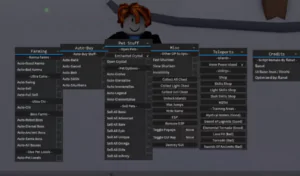
Ninja Legends OP GUI Script (No Keys)
This is an open-source script that allows you to farm unlimited coins and gems with ease.
✨ Features
Farm Coins
Farm Gems
Toggle Master Elements
📋 Script Code
local gui2 = Instance.new("ScreenGui")

gui2.Parent = game.Players.LocalPlayer:WaitForChild("PlayerGui")

-- Main Frame for GUI 2

local gui2Frame = Instance.new("Frame")

gui2Frame.Size = UDim2.new(0, 180, 0, 220) -- Increased height to fit entry & submit

gui2Frame.Position = UDim2.new(0.05, 0, 0.05, 0)

gui2Frame.BackgroundColor3 = Color3.fromRGB(50, 50, 50)

gui2Frame.Active = true

gui2Frame.Draggable = true

gui2Frame.Parent = gui2

-- Title

local gui2Title = Instance.new("TextLabel")

gui2Title.Size = UDim2.new(1, 0, 0, 18)

gui2Title.BackgroundColor3 = Color3.fromRGB(30, 30, 30)

gui2Title.Text = "Ninja Legends OP GUI"

gui2Title.TextColor3 = Color3.fromRGB(255, 255, 255)

gui2Title.TextSize = 10

gui2Title.Parent = gui2Frame

-- Toggle Master Elements GUI Button

local toggleButton = Instance.new("TextButton")

toggleButton.Size = UDim2.new(1, -10, 0, 20)

toggleButton.Position = UDim2.new(0, 5, 0, 30)

toggleButton.BackgroundColor3 = Color3.fromRGB(100, 100, 100)

toggleButton.Text = "Toggle Master Elements"

toggleButton.TextColor3 = Color3.fromRGB(255, 255, 255)

toggleButton.TextSize = 10

toggleButton.Parent = gui2Frame

-- Start Button

local startButton = Instance.new("TextButton")

startButton.Size = UDim2.new(1, -10, 0, 20)

startButton.Position = UDim2.new(0, 5, 0, 55)

startButton.BackgroundColor3 = Color3.fromRGB(100, 100, 100)

startButton.Text = "Start"

startButton.TextColor3 = Color3.fromRGB(255, 255, 255)

startButton.TextSize = 10

startButton.Parent = gui2Frame

startButton.MouseButton1Click:Connect(function()

local args = {

[1] = "convertGems",

[2] = -9999999999999999999999999999999999999999999999999999999999999999999999999999999999999999999999999999999999999999999999999999999999999999999999999999999999999999999999999999999999999999999999999999999999999999999999999999999999999999999999999999999999999999999999999999999999999999999999999999999999999999999999999999999999999999999999999999999999999999999999999999999999

}

game:GetService("ReplicatedStorage"):WaitForChild("rEvents"):WaitForChild("zenMasterEvent"):FireServer(unpack(args))

end)

-- ENTRY FIELD (Number Input)

local numberEntry = Instance.new("TextBox")

numberEntry.Size = UDim2.new(1, -20, 0, 25)

numberEntry.Position = UDim2.new(0, 10, 0, 80)

numberEntry.BackgroundColor3 = Color3.fromRGB(80, 80, 80)

numberEntry.Text = "Enter number"

numberEntry.TextColor3 = Color3.fromRGB(255, 255, 255)

numberEntry.TextSize = 10

numberEntry.ClearTextOnFocus = true

numberEntry.Parent = gui2Frame

-- SUBMIT BUTTON

local submitButton = Instance.new("TextButton")

submitButton.Size = UDim2.new(1, -20, 0, 25)

submitButton.Position = UDim2.new(0, 10, 0, 110)

submitButton.BackgroundColor3 = Color3.fromRGB(100, 100, 100)

submitButton.Text = "Submit"

submitButton.TextColor3 = Color3.fromRGB(255, 255, 255)

submitButton.TextSize = 10

submitButton.Parent = gui2Frame

-- SUBMIT FUNCTIONALITY

submitButton.MouseButton1Click:Connect(function()

local num = tonumber(numberEntry.Text)

if num and num > 0 and num <= 10000000000000000000000000000000000000000000000000000000000000000000000000000000000000000000000000000000000000000000000000000000000000000000000000000000000000000000000000000000000000000 then

game:GetService("ReplicatedStorage"):WaitForChild("rEvents"):WaitForChild("zenMasterEvent"):FireServer("convertGems", num)

else

numberEntry.Text = "Number too big!"

end

end)

-- Discord Button

local discordButton = Instance.new("TextButton")

discordButton.Size = UDim2.new(1, -10, 0, 20)

discordButton.Position = UDim2.new(0, 5, 0, 140)

discordButton.BackgroundColor3 = Color3.fromRGB(60, 60, 200)

discordButton.Text = "Join Discord"

discordButton.TextColor3 = Color3.fromRGB(255, 255, 255)

discordButton.TextSize = 10

discordButton.Parent = gui2Frame

discordButton.MouseButton1Click:Connect(function()

setclipboard("https://discord.gg/Dbut7ZsX") -- Copies link to clipboard

end)

-- Master Elements GUI

local masterGui = Instance.new("ScreenGui")

masterGui.Parent = game.Players.LocalPlayer:WaitForChild("PlayerGui")

masterGui.Enabled = false

local masterFrame = Instance.new("Frame")

masterFrame.Size = UDim2.new(0, 250, 0, 400)

masterFrame.Position = UDim2.new(0.2, 0, 0.2, 0)

masterFrame.BackgroundColor3 = Color3.fromRGB(0, 0, 0)

masterFrame.BackgroundTransparency = 0.5

masterFrame.Active = true

masterFrame.Draggable = true

masterFrame.Parent = masterGui

local masterTitle = Instance.new("TextLabel")

masterTitle.Size = UDim2.new(1, 0, 0, 30)

masterTitle.BackgroundColor3 = Color3.fromRGB(0, 0, 0)

masterTitle.Text = "Master Elements"

masterTitle.TextColor3 = Color3.fromRGB(255, 255, 255)

masterTitle.TextSize = 14

masterTitle.Parent = masterFrame

-- Container for Buttons

local scrollFrame = Instance.new("ScrollingFrame")

scrollFrame.Size = UDim2.new(1, 0, 1, -30)

scrollFrame.Position = UDim2.new(0, 0, 0, 30)

scrollFrame.CanvasSize = UDim2.new(0, 0, 0, 400) -- Allows scrolling

scrollFrame.ScrollBarThickness = 5

scrollFrame.BackgroundTransparency = 1

scrollFrame.Parent = masterFrame

-- Elements List

local elements = {

"Shadow Charge",

"Electral Chaos",

"Blazing Entity",

"Shadowfire",

"Lightning",

"Masterful Wrath",

"Inferno",

"Eternity Storm",

"Frost"

}

-- Create Buttons Inside Scroll Frame

for i, element in ipairs(elements) do

local button = Instance.new("TextButton")

button.Size = UDim2.new(1, -20, 0, 30)

button.Position = UDim2.new(0, 10, 0, (i - 1) * 35)

button.BackgroundColor3 = Color3.fromRGB(100, 100, 100)

button.Text = "Master " .. element

button.TextColor3 = Color3.fromRGB(255, 255, 255)

button.TextSize = 10

button.Parent = scrollFrame

-- Element Mastery Event

button.MouseButton1Click:Connect(function()

    game:GetService("ReplicatedStorage"):WaitForChild("rEvents"):WaitForChild("elementMasteryEvent"):FireServer(element)

end)

end

-- Toggle Function for Master Elements GUI

toggleButton.MouseButton1Click:Connect(function()

masterGui.Enabled = not masterGui.Enabled

end)
Script Info
🕐 Recent Scripts
![[WEATHER] Destroy a Vault 💰](https://scriptnokey.com/wp-content/uploads/2026/10/WEATHER-Destroy-a-Vault-💰-150x150.webp)
[WEATHER] Destroy a Vault 💰
[WEATHER] Destroy a Vault 💰 • 👁 47
Keyless

Can You Charge My Phone? script | OP, KEYLESS
Can You Charge My Phone? • 👁 48
Keyless

Fishing Master script | OP, Keyless
Fishing Master • 👁 45
Keyless
![AIMBOT Script [No Key] | NEWGOD](https://scriptnokey.com/wp-content/uploads/2026/10/aimbot-script-no-key-newgod-800w-150x150.webp)
AIMBOT Script [No Key] | NEWGOD
AIMBOT • 👁 48
Keyless

Sonic Speed Simulator By Snooze | Farm Exp, Rings, etc,
Sonic Speed Simulator • 👁 47
Keyless
