SURVIVE Hungry Worm
Keyless
SURVIVE Hungry Worm Script keyless
This script is designed for the Roblox game SURVIVE Hungry Worm ☠️, created by an unknown developer, and allows you to auto farm easily within the game.
✨ Features
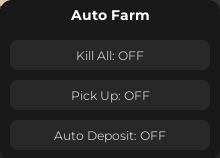
Auto Farm
Kill All
Pick Up
Auto Deposit
📋 Script Code
local Players = game:GetService("Players")
local ReplicatedStorage = game:GetService("ReplicatedStorage")
local UserInputService = game:GetService("UserInputService")

local player = Players.LocalPlayer
local playerGui = player:WaitForChild("PlayerGui")

-- =========================
-- REMOTES
-- =========================

local meleeRemote = ReplicatedStorage
    .A_FRAMEWORK.CurrentGame.Player.Melee.Admin.Melee.RemoteEvent_6

local pickupRemote = ReplicatedStorage
    .A_FRAMEWORK.CurrentGame.Player.Pickup.Pickup_Client.VerifyFunction_8

local campfireRemote = ReplicatedStorage
    .A_FRAMEWORK.CurrentGame.Player.Pickup.AddToCampfire.AddToCampfire.VerifyFunction_6

-- =========================
-- STATES
-- =========================

local killAll = false
local pickupAll = false
local autoDeposit = false

-- =========================
-- MOB FUNCTION
-- =========================

local function getMobHitboxes()
    local t = {}
    for _, v in ipairs(workspace.ServerSpawnPool:GetChildren()) do
        local hitbox = v:FindFirstChild("Hitbox", true)
        if hitbox then
            table.insert(t, hitbox)
        end
    end
    return t
end

-- =========================
-- KILL ALL LOOP
-- =========================

task.spawn(function()
    while true do
        if killAll then
            for _, hitbox in ipairs(getMobHitboxes()) do
                task.spawn(function()
                    meleeRemote:FireServer({hitbox})
                end)
            end
        end
        task.wait(0.2)
    end
end)

-- =========================
-- PICKUP FIX SYSTEM
-- =========================

local pickedRecently = {}

local function isValidItem(item)
    if not item or not item.Parent then return false end
    if not item:IsA("BasePart") and not item:IsA("Model") then return false end
    return true
end

task.spawn(function()
    while true do
        if pickupAll then
            local foodFolder = workspace.ServerSpawnPool:FindFirstChild("Food")

            if foodFolder then
                for _, item in ipairs(foodFolder:GetChildren()) do
                    if isValidItem(item) and not pickedRecently[item] then
                        pickedRecently[item] = true

                        task.spawn(function()
                            local success = pcall(function()
                                pickupRemote:InvokeServer(item)
                            end)

                            if not success then
                                pickedRecently[item] = nil
                            else
                                task.delay(2, function()
                                    pickedRecently[item] = nil
                                end)
                            end
                        end)

                        task.wait(0.05) -- prevents spam issues
                    end
                end
            end
        end

        task.wait(0.3)
    end
end)

-- =========================
-- AUTO DEPOSIT LOOP
-- =========================

task.spawn(function()
    while true do
        if autoDeposit then
            pcall(function()
                campfireRemote:InvokeServer()
            end)
        end
        task.wait(1)
    end
end)

-- =========================
-- GUI
-- =========================

local gui = Instance.new("ScreenGui")
gui.Name = "FarmUI"
gui.Parent = playerGui
gui.ResetOnSpawn = false

local frame = Instance.new("Frame")
frame.Size = UDim2.new(0, 220, 0, 160)
frame.Position = UDim2.new(0.5, -110, 0.5, -80)
frame.BackgroundColor3 = Color3.fromRGB(25, 25, 25)
frame.BorderSizePixel = 0
frame.Parent = gui

Instance.new("UICorner", frame).CornerRadius = UDim.new(0, 12)

local title = Instance.new("TextLabel")
title.Size = UDim2.new(1, 0, 0, 30)
title.BackgroundTransparency = 1
title.Text = "Auto Farm"
title.TextColor3 = Color3.fromRGB(255,255,255)
title.Font = Enum.Font.GothamBold
title.TextSize = 16
title.Parent = frame

-- =========================
-- TOGGLE CREATOR
-- =========================

local function createToggle(name, yPos, callback)
    local btn = Instance.new("TextButton")
    btn.Size = UDim2.new(1, -20, 0, 30)
    btn.Position = UDim2.new(0, 10, 0, yPos)
    btn.BackgroundColor3 = Color3.fromRGB(40,40,40)
    btn.TextColor3 = Color3.fromRGB(200,200,200)
    btn.Font = Enum.Font.Gotham
    btn.TextSize = 14
    btn.Text = name .. ": OFF"
    btn.Parent = frame

    Instance.new("UICorner", btn).CornerRadius = UDim.new(0, 8)

    local state = false

    btn.MouseButton1Click:Connect(function()
        state = not state
        btn.Text = name .. ": " .. (state and "ON" or "OFF")
        btn.BackgroundColor3 = state and Color3.fromRGB(60,120,60) or Color3.fromRGB(40,40,40)
        callback(state)
    end)
end

-- =========================
-- TOGGLES
-- =========================

createToggle("Kill All", 40, function(v)
    killAll = v
end)

createToggle("Pick Up", 80, function(v)
    pickupAll = v
end)

createToggle("Auto Deposit", 120, function(v)
    autoDeposit = v
end)

-- =========================
-- DRAGGING
-- =========================

local dragging, dragInput, dragStart, startPos

frame.InputBegan:Connect(function(input)
    if input.UserInputType == Enum.UserInputType.MouseButton1 then
        dragging = true
        dragStart = input.Position
        startPos = frame.Position

        input.Changed:Connect(function()
            if input.UserInputState == Enum.UserInputState.End then
                dragging = false
            end
        end)
    end
end)

frame.InputChanged:Connect(function(input)
    if input.UserInputType == Enum.UserInputType.MouseMovement then
        dragInput = input
    end
end)

UserInputService.InputChanged:Connect(function(input)
    if input == dragInput and dragging then
        local delta = input.Position - dragStart
        frame.Position = UDim2.new(
            startPos.X.Scale,
            startPos.X.Offset + delta.X,
            startPos.Y.Scale,
            startPos.Y.Offset + delta.Y
        )
    end
end)
🎮 Similar Scripts
Script Info
🕐 Recent Scripts

Catch And Tame Script | Auto Buy, Auto Collect, Teleport to Pet
Catch And Tame • 👁 1
Keyless

Vexlo Hub Script Keyless for MM2
Murdеr Mystеry 2 • 👁 5
Keyless

Murdurr Script Keyless and open source
MurDurr • 👁 5
Keyless

Steal the brainrot base script keyless – Auto farm
Steal The Brainrot Base • 👁 5
Keyless

Best Script for +1 Health Per Click (Keyless)
+1 Health Per Click • 👁 6
Keyless
